eM Client Beta 11.0.282: Exchange emails not loading (endless loading spinner)

Hello eM Client Support Team,

I am currently using the eM Client Beta (version 11.0.282) on a Windows 11 PC with a Microsoft Exchange account.

Starting today, I have been experiencing an issue where new incoming emails show up in my inbox list with their subject lines, but the actual email content does not load. Instead, there is just an endless loading indicator/spinner, and nothing happens.

I have verified that everything is working perfectly fine when using Outlook with the same account, so this issue seems to be specific to eM Client.

Could you please let me know if this is a known bug in this beta release, or if there is a workaround/solution to resolve this?

Thank you in advance for your help.

I am currently using the eM Client Beta (version 11.0.282) on a Windows 11 PC with a Microsoft Exchange account.

Starting today, I have been experiencing an issue where new incoming emails show up in my inbox list with their subject lines, but the actual email content does not load.

Did you try removing the exchange account and readding as a Graph account setup ?

Or did you leave your exchange account and just add it again as a graph account setup ?

EM321 RNA hardware issue at component location U30

That error looks to me like a eg: network hardware related error like with whatever adapter you are using to physically connect to the internet

Are you physically connected via a eg: lan adapter / network card through any switches or hubs etc to get to your modem / router ?

Or do you connect directly via Wifi to your Wif modem router ?

Also are you running and optionally installed firewall / security programs or optionally installed antivirus programs or vpns ?

Hi Support Team,

Yes, I have removed the Exchange account and set up a new one as a Graph account.

However, the problem remains—I still cannot see some emails (not all of them, just certain ones). As mentioned before, everything works perfectly fine in Outlook.

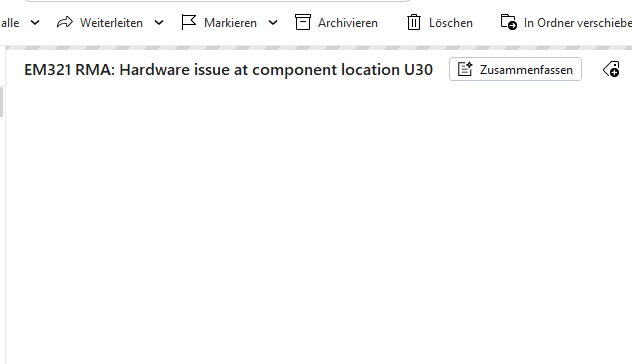
Regarding “EM321 RNA hardware issue at component location U30”, this is not an error message, but rather the subject line of an email that I cannot open or see. :slight_smile:

Additionally, there is another issue: I can no longer see my shared mailbox. It has stopped working ever since I started using the Graph account in Beta 11.

Best regards

Yes, I have removed the Exchange account and set up a new one as a Graph account.

However, the problem remains—I still cannot see some emails (not all of them, just certain ones). As mentioned before, everything works perfectly fine in Outlook

Ok as a new graph account also hasn’t made any difference try repairing your Inbox and see if that makes any difference, as “could be your local cache is corrupted” & not showing the messages.

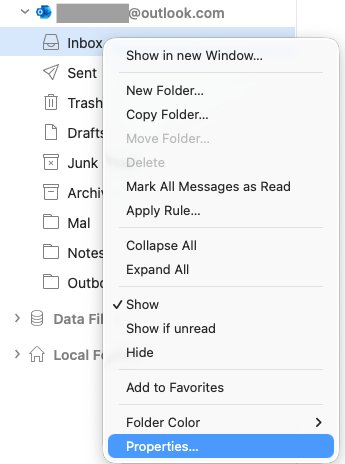
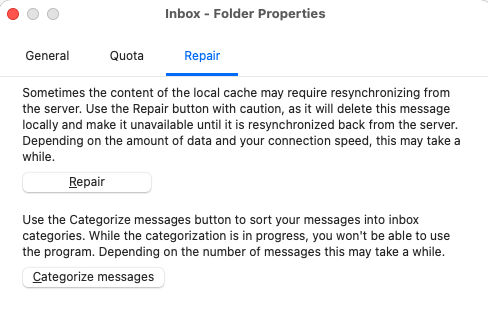
So to repair your exchange or graph account mailbox, “right click on your Inbox” and click “Properties” at the bottom. Then click the “Repair” tab along the top and finally click Repair. That clears the local account cache and syncs new from your server end. Once the cache is cleared, your messages will be a slower to reread till fully cached locally again so be patient. Example Outlook account repair below.

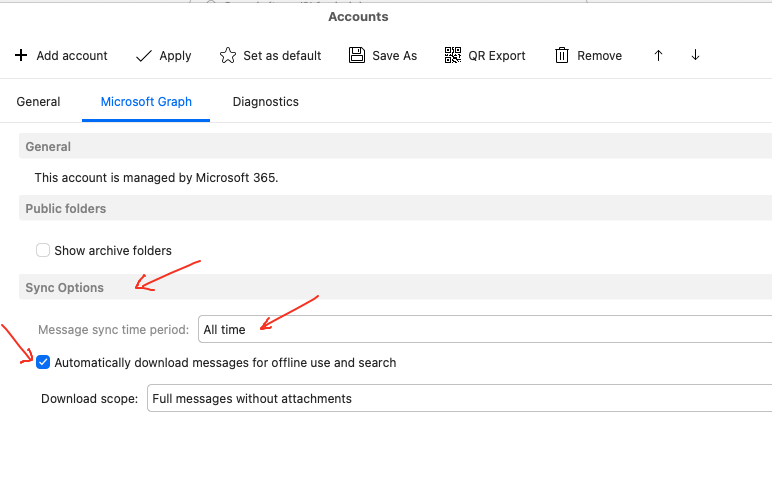
Also you can speed up message downloading “which also might help with your issue” by going into your Exchange or Graph account setup via “Menu / Accounts” and enable to “automatically download messages for offline use and search” as per the below Graph account example below.

If repairing your Inbox or enabling to automatically download messages for offline use makes no differance to your issue, then I would next “try completely power off your computer and modem / router for eg: 2 min and then turn back on incase it’s a physical connection issue.

Also sometimes external resident programs can interfere with mail downloading. So if you have any eg: optionally installed firewall / security programs or optionally installed antivirus programs or vpns “other than what comes default with your OS”, try completely disabling those to test incase any interference.

If you have no optionally installed programs like the above or you do but disabling them makes no difference, then suggest you next email [email protected] to advise of your issue if you haven’t already and link this thread in your email.

Additionally, there is another issue: I can no longer see my shared mailbox. It has stopped working ever since I started using the Graph account in Beta 11

Suggest then you email the Beta team as to why you can no longer see your shared mailbox.

Regarding “EM321 RNA hardware issue at component location U30”, this is not an error message, but rather the subject line of an email that I cannot open or see

Ok sorry I thought it was an error message rather than something in your email message.
Hi
I Seem to have a similar issue. Within the inbox, certain emails, generally in conversations, do not show the detail in the message, either in the preview window or when I double click and fully open the message, I just get the orange and white stripe loading at the top. However in the Inbox with preview of the subject and first line of the detail. I see this just fine. This does not happen on all emails.

Hi @cyberzork,

I’ve tried everything possible, but the issues described above still persist:

  • Some emails are not readable.
  • Shared accounts are no longer visible or usable.
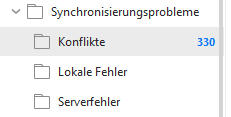
  • There are massive synchronization issues – there are already 330 emails in the ‘Conflicts’ folder. (new one)

Unfortunately, I have to opt out of the beta test, as eM Client 11 Beta is unusable for me with these kinds of problems. I hope these will be fixed in the future. If not, my multi-year eM Client era will unfortunately come to an end.

Some emails are not readable

Sometimes specific sender email might not be readable due to eg: non standard html coding that can be investigated by official support if you eg: right click your mouse in the body of the email that is not readable and choose Save As and save to (.eml) in a folder on your desktop or downloads.

If it’s only not readable after upgrading to V11 Beta then email the team to advise and attach your saved (.eml) example file to be investigated.

If the sender specific email is also not readable in V10 either, then if you have a current active paid license go to the VIP support page and login and lodge a support ticket and also attach that example saved (.eml) file to be investigated.

Shared accounts are no longer visible or usable

This could be happening in Graph due to eg: Graph shared folders might yet be supported at the server end and only show visible in Exchange. But you would need to email the Beta team to check.

There are massive synchronization issues – there are already 330 emails in the ‘Conflicts’ folder. (new one)

I have no idea why that is happening with V11 Beta so suggest you email the Beta team for help.

Unfortunately, I have to opt out of the beta test, as eM Client 11 Beta is unusable for me with these kinds of problems. I hope these will be fixed in the future. If not, my multi-year eM Client era will unfortunately come to an end

I’m sure all those issues you are having came be resolved. Best to send all these issues to the team at [email protected] for assistance and link this thread in your email to them.

I have tried repairing Database, and restarting machine. However just to note, these messages when first arrive, can be read no problem, then later when going onto the message, it fails to load in the preview box or when opening fully. This seems random on certain emails. I do fully download all emails including attachments. It seems to happen to entire conversations. So I may have 6 or 7 emails in a conversation with multiple recipients, and then the latest email will become blank, and going to the previous emails, they are also blank.