Using the latest V11.0.108 Beta on ARM CPU, the speed of opening & running eM Client in general is way faster now compared to V10. So well done to the team for speeding that up.
Note:- The only thing i found was that the installation time is longer than with V10 installs.
I have a non-ARM Intel Xeon w5-2465X (3.1 GHz) and see the opposite. If i start my computer, coold boot, it takes 36 seconds till i can even see the UI. It takes a whopping 20 seconds before the splash screen shows.
EDIT:
I had to restart my computer and tested this again and now it took 3 seconds to get the splash screen and 5 seconds till i got to the UI. So i shutdown the computer for a coold boot and now it took 2 seconds to get to the splash screen and 4 seconds till i got to the UI. Strange…
As yours is taking 36 seconds on your Intel Xeon w5-2465X CPU, i would email that info to the Beta team email address [email protected] to advise with your CPU type.
I am running eMC v11.0.108.0 on this Laptop eMC; starts so fast I don’t
even try to time it. The Laptop is used as a test bed.
I do not start eMC on OS boot, always after OS is booted; Laptop is only
shut down maybe once a week or restart with software updates and usually
started from Sleep.
Also I have to say that I have never understood the fixation that many have
with the speed of eMC start up, for me it has never been an issue, and it
it became noticeably slow I would fist check the OS.
Lenovo Thinkpad P17 Intel Xeon W-10885M vPro Processor
(2.40GHz, up to 5.30GHz with Turbo Boost, 8 Cores, 16MB Cache)
Win 11 Pro x64 25H2
64GB(16x4) DDR4 2933MHz ECC SoDIMM
512GB SSD, M.2 2280. PCle-NVMe, OPAL2.0,TLC (X4)
17.3" UHD (3840x2160) IPS Anti Glare 500nits Non-Touch
NVIDIA Quadro RTX 5000 16GB GDDR6 256bits
IR & 720p HD Camera & Mike
Intel Wi-Fi 6 AX201 2x2 AX, Bluetooth Version 5.0 vPro
Backlit Keyboard Spanish (ES) with Number Pad
Fingerprint Reader
skybat
¡Buena suerte!
¡Saludos desde Valencia la soleada en España!
¡Mis mejores deseos y mantente a salvo!
That’s probably an OS issue. Some things in OS may slow down execution process substantially (ie security checks). Please note that eM Client does really minimum processing before the splash screen is shown, so if the big percentage of the starting slowness happens between execution and showing the splash screen, highly probably OS (Windows) is much more accountable for that delay than eM Client.
Googling Xeon CPUs with eg: Windows 11 these are what a lot of peeps do if they find programs are randomly slow to load some of the time.
Try changing the Windows power mode (power and battery) to “best performance or high performance” so the cpu cores don’t go down to idle too much if it’s in power saving mode.
Also if you have M2 NVME drives, try disabling the power management on the drives which is usually in Control Panel / Advanced power settings and under the PCI Express you will normally find an option called Linked state power management. Try turn that off.
Also in the Windows security settings in Virus and Thread protection, go down to manage settings and scroll down to exclusions and add in eM Client to make sure that’s not been restricted in some way.
Lastly also check with your motherboard manufacturer if they have any later chipset software or management engine drivers which controls everything going on with Windows etc.
Yes I understand, however, the big difference is why I would first, as you did,
reboot the OS which perhaps solved your issue - I don’t know as you have not
reported further on subsequent start ups of eMC.
As an aside I do believe that it is always prudent to start Apps after OS boot,
it negates the possibility of conflicts and overload demand on CPU, RAM, etc,
particularly if the spec is a basic minimum.
skybat
¡Buena suerte!
¡Saludos desde Valencia la soleada en España!
¡Mis mejores deseos y mantente a salvo!
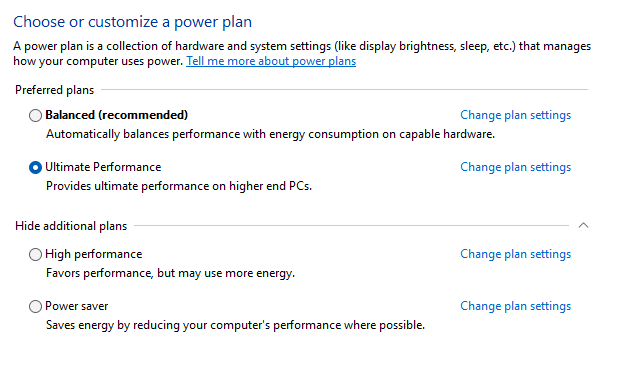
I use Windows 11 Pro for Workstation so i have the Ultimate Performance power plan there. All the other settings you mention is already set, either by the power plan and/or by me. No power saving on anything and Fast Startup disabled.
All other apps, Adobe Creative Cloud, MS Office and more starts lightning fast.
I shut down the computer earlier this day for an errand i had to do and when i came back now the sloooow start is back. Maybe better tomorrow, so i will do nothing for the moment.
The good thing is that V10 were always very slow to launch while V11 is better, many times sloooow and some times very fast. It beta, so hopefully it will sort itself out.
I use Windows 11 Pro for Workstation so i have the Ultimate Performance power plan there. All the other settings you mention is already set, either by the power plan and/or by me. No power saving on anything and Fast Startup disabled.
Then could be possible something running on startup resident in the background as @skybat advised in his post above. Try disable all background tasks on startup other than the basic Windows stuff and see if that makes any differance to rule out if its something in there.