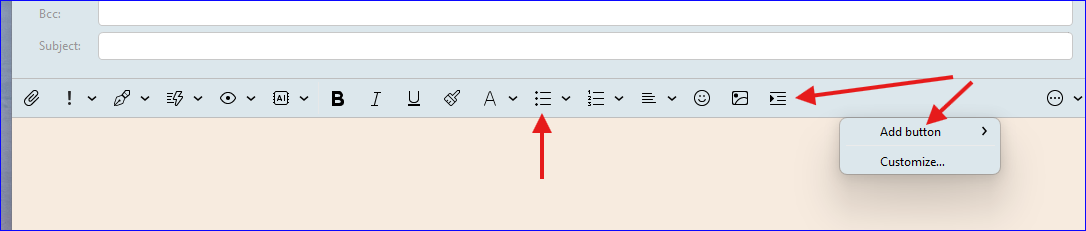
When I write, I frequently create bullet lists.
Occasionally, I make numbered lists.
I need a readily-available menu item or the ability to create a shortcut key to do so.
Note:
emClient does many things spectacularly well, and I appreciate that has so many formatting options but, as a result, simple things are buried several levels down in the menu hierarchy.
To create a bullet list, for example: Right click > Format > Bullets > Disc > Select.
That’s 5 steps in many of the emails I create.
“Quick Actions” looked like the path to salvation, but then I discovered it doesn’t include formatting options. (Drat.)
Would this help if there was an icon to click? You can customize the buttons along the top border of your message composition area. (Windows) Right-click to reveal the “Add button” option. The left most arrow shows my bullet option.
This is where emclient is sucking at the moment: no shortcuts for basic formatting (centre allign, bullets, FONT SIZE CHANGE)
After being in notion and todoist for a couple of years now, it just feel fustrating not being able to type " /* " or “* + entre” to start a bullet list.
Event being able to shortcut them "“ctrl + *” for bullet point or “ctrl + shift + ‘+’” to increase font size. These would be game changers! you have it in this text input box on the fourum, why not on the program!?
Please look at this Devs, its one thing thats got me going back to outlook i think, as its just such a slow down of workflow.
Hello, thank you for your suggestions.
We’ll add the shortcut for bullet points (ctrl-shift-l) and we’ll add Increase and decrease font buttons to customizable toolbar buttons with default shortcuts (ctrl-[) and (ctrl-])
Dang. Thanks, Tony.
Yes. That would have helped a LOT.
A toolbar like that one is ALL I need for 99% of everything I do.
That’s what I’m used to in every other app, too. So, yeah, I’d still be using eMc if I’d known about it (and may well come back because of it.
I therefore change this request to a suggestion:
Have a common set if actions like yours visible when the app is first started, with “(Right-click to Add)” as a text-item at the end. (The prompt could disappear on it’s own after a while, or be one of the customizable “buttons”,)
Thanks to Tony_W’s suggestion, I reinstalled emClient and found the toolbar already there. (Too cool.) I’m not going to customize it to match his. (I already customized a little. Easy! And his settings are better than the defaults, imho.)
I saw responses to other comments, as well. That kind of responsiveness makes a big difference—so I am back in the emClient camp!