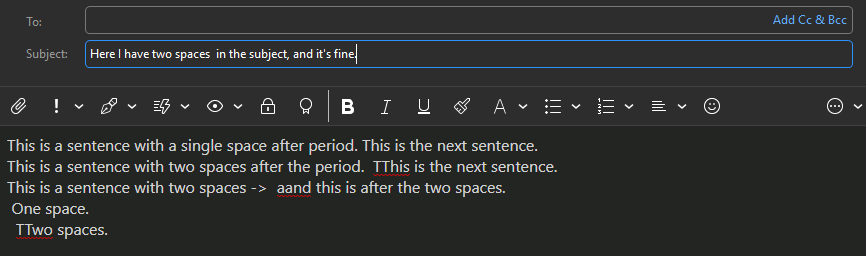
After updating to 10.4.5600, whenever I type a double space when composing an email, the next character I type is also doubled. I haven’t made any config changes after the update, and this doesn’t happen in any other application (and so far, only within the body text area of the compose window). It also doesn’t have to be after a period (where I usually see it happening), just pressing space twice then another character, that character will be duplicated.
Any thoughts/suggestions on what may be causing this?
Thanks!
(I know I don’t have to type double spaces after a period, but it’s muscle memory at this point ;-).
After updating to 10.4.5600, whenever I type a double space when composing an email, the next character I type is also doubled
Do you mean, after you are pressing the spacebar twice, or is it happening after typing a special character or characters and if it is, what character/s exactly ?
Also what “Language” have you set in Settings and what Compose / Preferred Fon’t Style and Size have you set in Settings ?
Lastly do you have Windows or Mac and what OS version ?
After pressing the spacebar twice, whatever I type next is doubled. So if I type “a” I get " aa". Not limited to any specific characters, just whatever I type after spacebar twice.
Language is English (United States)
Preferred Font Style is Segoe UI, 12pt
This is on Windows 11 (25H2 Build 26200.8737)
Out of curiosity I tried changing the font inline, and when it does the duplicate character, it changes it back to the default font. I tried changing the default font (ie, to Arial), and whenever it does the duplication, it changes to that font (so it’s not just Segoe UI).
I tested that scenario with US English Language in Settings and Segoe UI, 12pt for Compose Preferred font in Settings with Windows 11 Pro (25H2) and cannot replicate that problem. Even testing other default fonts and languages didn’t strike that issue at all.
So could be possibly something happened when you installed the update and maybe it didn’t install 100% somewhere, or maybe something changed in the OS recently thats affecting it etc.
So try first backing up eM Client via “Menu / Backup”. You can see when thats completed in Show Operations via the dropdown on the right of Refresh. Then “close eM Client” and then uninstall eM Client and “don’t delete the database” when asked on the uninstall wizard.
Then redownload V10.4.5600 from the release history page and reinstall and see if that fixes it.
Failing that suggest to try “shutdown and reboot your computer” if you haven’t already incase its something possibly running resident interferring with the mail client.
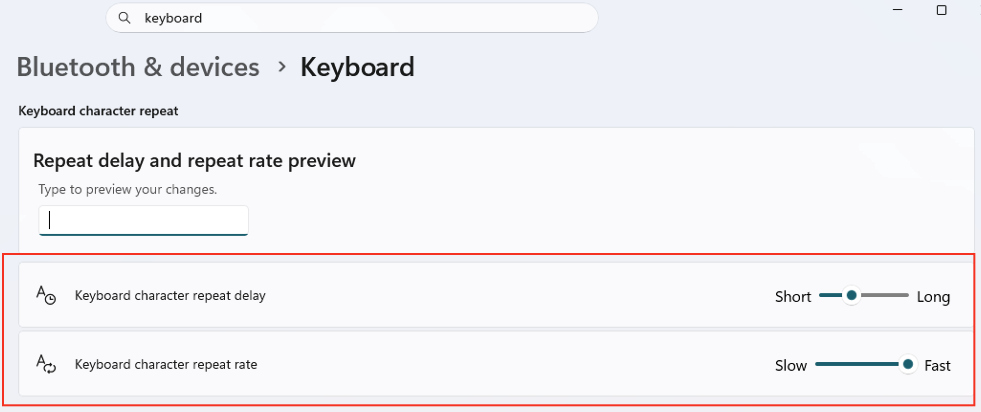
Apart from that also check your Windows OS keyboard and Accessibility keyboard settings incase they have changed, as can sometimes affect things in programs if they have been adjusted. These are my personal Win 11 Keyboard Settings which then work fine for me.
I can here with the same problem. I am running with the exact same set up (version, font, OS). Any resolution yet? It has to be an introduced bug. The double character issue happens when the spacing is in multiples of two (2,4,6,8). It is driving me crazy. I am one of those sinners who likes to double space after a period and this is driving me crazy. It only happens in eM Client.
Thanks for looking into this! I uninstalled and re-installed, and rebooted, and double checked my windows keyboard settings and everything looks good, yet the issue still happens. Seeing as how there is another report of this happening (that just came in), it sounds like there may be a bug in a setting within eM Client somewhere.
I just updated my laptop to 10.4.5600 and it now has the same double-character after any multiple of two spaces. Before the update, I was on version 10.4.5326 and I confirmed the issue was not happening. So it’s definitely something new in 10.4.5600.
Hey all, I did report this to Kim @ Emclient and she’s looking into it. Its tied to the capitalize first lettter setting and happens at sentence editing.I too have reinstalled and this problem occurred after.5400. I tested with a low level keyboard input reader and it is EMclient only doing it.