I’m trying to block incoming spam from specific domains that frequently switch subdomains (e.g., mail1.domain.com, news.domain.com, etc.).
When I add @domain.com (or just domain.com) to the Blacklist under Settings > Mail > Blacklist, it seems that emails coming from subdomains are still getting through.
A couple of quick questions regarding this:
Does the default eM Client Blacklist rule cover subdomains automatically, or do I really have to add every single sub-domain individually?
Is there a trick or wildcard syntax (such as @*.domain.com or using asterisks) when adding entries to the Blacklist list?
If wildcards aren’t supported in the standard Blacklist, is creating a custom Rule with “with words found in header” or “From address contains…” the recommended workaround to catch all subdomains?
The missing spam filter in EMClient has been a major issue for me since I started using the product, as have all my colleagues who also use it. Way too many emails get through the server‑side spam filter. Not only that, but there are emails I want to blacklist; they’re not really spam—just people trying to write me a personal email about something, and I don’t want to see them. These days there’s a lot of people looking for work…
I have created a separate account on my email server where I forward all emails. I’ve given Open Claw agents access to this folder, to protect my normal inbox. Likewise, they can send emails through that account. Anyway, now that my agents can read emails, I have built an external spam filter. This is very useful.
I can the get the agents to remove (or move) blacklisted or spam detected emails out of the agent inbox, making my life a lot easier. It also means that my agents have fewer emails to analyse when drafting replies or copying emails into pipedrive. This saves a lot of tokens and money!! My day is simply better !!
This is, for me, a major breakthrough when processing and working with emails.
Unfortunately this means I spend most of my time working in my agent’s account rather than my personal account. I’ve asked the agent to create a blacklist of accounts that should not be let through. Exported this as an XML file. And then I tried imported it into my regular EMClient account blacklist. Unfortunately Even though it says it should import an XML file, it just doesn’t do it. I’ve tried modifying the XML file; no matter what I do, it won’t import. It comes up with an error message. This appears to be a long‑lasting bug.
And, in answer to your question, if you simply use an “@” and then the domain name, you can block the whole domain. I’ve also asked my agents to do this.
This is a very cumbersome way of overcoming the spam limitations in the EMClient.
No, the Blacklist does not include subdomains automatically, when you blacklist from the message you can only do full email address or full domain.
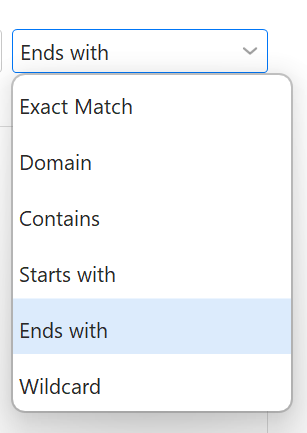
You can add items to the Blacklist rule manually in Settings>Mail>Blacklist and whitelist, and get more options - such as “contains” or “ends with” to cover subdomains.
Yes you could also create a custom rule, either using From people (and using the same contains/ends with specifications) or words in header (from:domain.com)
As for the import issue you experience @Thos:
The XML import is for eM Client settings, not for any XML. If the list you are trying to import is not in the correct format, it will be rejected since eM Client wouldn’t be able to parse it.
Try exporting the eM Client blacklist first and then have your agent merge its list into it using the same formatting as eM Client.
If you need further help, you can send that XML to our team at [email protected] to look into and we can see if there is indeed a bug or if the formatting needs to be changed further.