Hi there, I use the eM Client Free. I migrated the e-mail account from another e-mail client. It’s all Ok, all the folders and messages were imported correctly, including the folders I’ve created. These folders I’ve created are under the “More” node in the left pane. My question is: How do I create new folders under the “More” node with the same level of the existing ones? If I right-click over it, the context menu shows the item “New folder” disabled, but if I try to create a subfolder, it works fine. Thanks for the assistance.
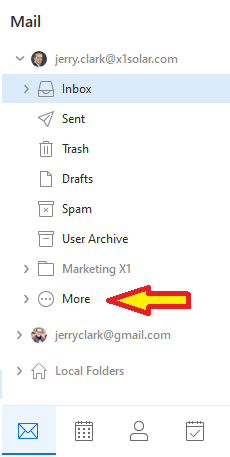
To create more Parent (Root) Account folders under the More Menu, “right click on your email address” above your Inbox and create your folder.
Then “right click on your new folder” and click “Hide” which will then move it under More.
If you later want it back above More, right click on the folder and press “Show”.
Thanks for your explanation, but couldn’t it be with a simple right-click on “More” node? Why to turn it so complicated?
The More menu “is just a separator” and is not designed to create folders. Creating parent / root folders can only be done by right clicking on your actual email address account above your inbox.
If you create a lot of parent / root folders and you want a quicker way to hide them below the More menu, you can right click on your email address and click “Show / Hide folders as per example below.

Ok, got it. Thanks! 