Help please - a red exclamation mark has appeared at top of left hand column and auto downloading of I/C emails has ceased.
Click on the Exclamation mark / red Triangle and update what the error says.
Or click the dropdown on the right of Refresh and click Show Operations and click the Errors and Log tabs and look for any obvious error messages and paste them in this thread.
Blank out anything personal in the errors.
Also update what version of eM Client you have, and what specific mail account you are using.
Also if you are running any eg: optionally installed firewall / security programs or optionally installed antivirus programs or vpns, “other than what comes default with the OS”, try completely disabling those to test incase of interference.
Hi cyberzork and many thanks for your interest.. Please be aware although 89 years young , I have reasonable computer knowledge but I am by no means ‘literate’, so I may struggle!
Firstly brief history - installed 16.09.25 from previous Windows Live Mail - installation with multiple storage folders proceeded smoothly and functioned well until 3 October at which time the auto download of I/C mails stopped working. I have no recollection of any activity of mine which may have caused this.
Clicking on the red triangle now produces no error report BUT earlier in the sequence a note appeared which I cannot recall accurately but was “download of messages not completed” or words to that effect.
Version:- 10.3.2619.0
Mail account - YAHOO.COM via SKY
Currently, am still using Windows 7 SP1 but plan to transfer to W.10 very shortly. Norton 360 is installed but has had no recent/relevant changes.
No Errors are listed but the log follows which is way beyond my understanding and has been truncated as it is too long to transmit in full:-
eM Client 10.3.2619+1e54f4a61e (Windows)
17:07:53 Online state: changed to online due to NetworkAvailability
17:07:53 [email protected] CardDAV Synchronizing account properties: For host https://carddav.address.yahoo.com/.well-known/carddav
17:07:53 [email protected] CalDAV Synchronizing account properties: For host https://caldav.calendar.yahoo.com/.well-known/caldav
17:07:55 [email protected] CardDAV Synchronizing account properties: Done
17:07:55 [email protected] CardDAV Synchronizing folder list
17:07:58 [email protected] CalDAV Synchronizing account properties: Done
17:07:58 [email protected] CalDAV Synchronizing items: For folder [email protected]
17:07:58 [email protected] CalDAV Synchronizing items: Sync of [email protected] finished: 0 uploaded, 0 deleted, 0 obsolete, 0 items, 0 downloaded
17:07:58 [email protected] CalDAV Synchronizing items: Done
17:07:58 [email protected] CalDAV Synchronizing folder list
17:07:59 [email protected] CalDAV Synchronizing items: For folder [email protected]/R J Day
17:07:59 [email protected] CalDAV Synchronizing items: Sync of [email protected]/R J Day finished: 0 uploaded, 0 deleted, 0 obsolete, 0 items, 0 downloaded
17:07:59 [email protected] CalDAV Synchronizing items: Done
17:07:59 [email protected] CalDAV Synchronizing items: For folder [email protected]
17:07:59 [email protected] CalDAV Synchronizing items: Sync of [email protected] finished: 0 uploaded, 0 deleted, 0 obsolete, 0 items, 0 downloaded
17:07:59 [email protected] CalDAV Synchronizing items: Done
17:08:00 [email protected] IMAP Uploading item(s) to folder ‘/Sent’
17:08:00 [email protected] CalDAV Synchronizing folder list
17:08:00 [email protected] CalDAV Synchronizing items: For folder [email protected]/R J Day
17:08:00 [email protected] CalDAV Synchronizing items: Sync of [email protected]/R J Day finished: 0 uploaded, 0 deleted, 0 obsolete, 0 items, 0 downloaded
17:08:00 [email protected] CalDAV Synchronizing items: Done
17:08:00 [email protected] CalDAV Synchronizing items: For folder [email protected]
17:08:00 [email protected] CalDAV Synchronizing items: Sync of [email protected] finished: 0 uploaded, 0 deleted, 0 obsolete, 0 items, 0 downloaded
17:08:00 [email protected] CalDAV Synchronizing items: Done
17:08:01 [email protected] [IMAP] MailClient.Accounts.ConnectionException: Failed opening connection to server.
—> System.IO.IOException: Unable to read data from the transport connection: An existing connection was forcibly closed by the remote host..
—> System.Net.Sockets.SocketException (10054): An existing connection was forcibly closed by the remote host.
— End of inner exception stack trace —
at System.Net.Sockets.Socket.AwaitableSocketAsyncEventArgs.ThrowException(SocketError error, CancellationToken cancellationToken)
at System.Net.Sockets.Socket.AwaitableSocketAsyncEventArgs.System.Threading.Tasks.Sources.IValueTaskSource<System.Int32>.GetResult(Int16 token)
at System.Net.Security.SslStream.EnsureFullTlsFrameAsync[TIOAdapter](CancellationToken cancellationToken, Int32 estimatedSize)
at System.Runtime.CompilerServices.PoolingAsyncValueTaskMethodBuilder1.StateMachineBox1.System.Threading.Tasks.Sources.IValueTaskSource.GetResult(Int16 token)
at System.Net.Security.SslStream.ReceiveHandshakeFrameAsync[TIOAdapter](CancellationToken cancellationToken)
at System.Net.Security.SslStream.ForceAuthenticationAsync[TIOAdapter](Boolean receiveFirst, Byte reAuthenticationData, CancellationToken cancellationToken)
at MailClient.Imap.Base.Connection.<>c__DisplayClass82_0.<b__0>d.MoveNext()
— End of stack trace from previous location —
at MailClient.Imap.Base.TransportPipe.<>c__DisplayClass28_0.<b__0>d.MoveNext()
— End of stack trace from previous location —
at MailClient.Imap.Base.TransportPipe.UpgradeStreamAsync(Func2 callback) at MailClient.Imap.Base.Connection.ConnectAsync(Func2 getStream, CancellationToken cancellationToken)
at MailClient.Imap.Base.Connection.ConnectAsync(Func2 getStream, CancellationToken cancellationToken) at MailClient.Protocols.Imap.ConnectionPoolEntry.ConnectInternalAsync(CancellationToken cancellationToken) --- End of inner exception stack trace --- at MailClient.Protocols.Imap.ConnectionPoolEntry.ConnectInternalAsync(CancellationToken cancellationToken) at MailClient.Protocols.Imap.ConnectionPoolEntry.ConnectInternalAsync(CancellationToken cancellationToken) at MailClient.Protocols.Imap.ConnectionPool.AcquireConnectionAsync(Folder mailFolder, Boolean noSelect) at MailClient.Protocols.Imap.ConnectionContext.CreateContextAsync(ImapAccount account, Folder folder, Boolean noSelect) at MailClient.Protocols.Imap.ImapMailSynchronizer.AppendAsync(IItemUploadContext1 uploadContext, FolderInfo info, UploadItem item, CancellationToken cancellationToken)
at MailClient.Protocols.Imap.ImapMailSynchronizer.UploadAsync(IItemUploadContext1 uploadContext, Folder folder, IEnumerable1 items, CancellationToken cancellationToken)
at MailClient.Protocols.Imap.ImapMailSynchronizer.Upload(IItemUploadContext1 uploadContext, Folder folder, IEnumerable1 items, CancellationToken cancellationToken)
at MailClient.Protocols.Common.ItemSynchronizer2.<>c__DisplayClass32_0.<EnqueueUpload>b__0(WorkerStatus status, CancellationToken cancellationToken) at MailClient.Protocols.Imap.ImapActionCommand.<>c__DisplayClass11_0.<.ctor>b__0(WorkerStatus ws, CancellationToken ct) at MailClient.Protocols.Imap.ImapActionCommand.ExecuteInternalSync(WorkerStatus status) at MailClient.Protocols.Imap.ImapActionCommand.Execute(WorkerStatus status) at MailClient.Commands.Command.Process(WorkerStatus status) AccountId = 08655317-112e-4a3a-948f-95e00925e185 AccountName = [email protected] IMAP_SERVER_TYPE = Yahoo RunInPlace = False GUIStatus_Exception_Reported = True 17:09:19 [email protected] IMAP Uploading item(s) to folder '/Sent' 17:09:19 [email protected] CardDAV Synchronizing folder list 17:09:19 [email protected] CalDAV Synchronizing folder list 17:09:20 [email protected] [IMAP] MailClient.Accounts.ConnectionException: Failed opening connection to server. ---> System.IO.IOException: Unable to read data from the transport connection: An existing connection was forcibly closed by the remote host.. ---> System.Net.Sockets.SocketException (10054): An existing connection was forcibly closed by the remote host. --- End of inner exception stack trace --- at System.Net.Sockets.Socket.AwaitableSocketAsyncEventArgs.ThrowException(SocketError error, CancellationToken cancellationToken) at System.Net.Sockets.Socket.AwaitableSocketAsyncEventArgs.System.Threading.Tasks.Sources.IValueTaskSource<System.Int32>.GetResult(Int16 token) at System.Net.Security.SslStream.EnsureFullTlsFrameAsync[TIOAdapter](CancellationToken cancellationToken, Int32 estimatedSize) at System.Runtime.CompilerServices.PoolingAsyncValueTaskMethodBuilder1.StateMachineBox1.System.Threading.Tasks.Sources.IValueTaskSource<TResult>.GetResult(Int16 token) at System.Net.Security.SslStream.ReceiveHandshakeFrameAsync[TIOAdapter](CancellationToken cancellationToken) at System.Net.Security.SslStream.ForceAuthenticationAsync[TIOAdapter](Boolean receiveFirst, Byte[] reAuthenticationData, CancellationToken cancellationToken) at MailClient.Imap.Base.Connection.<>c__DisplayClass82_0.<<ConnectAsync>b__0>d.MoveNext() --- End of stack trace from previous location --- at MailClient.Imap.Base.TransportPipe.<>c__DisplayClass28_0.<<UpgradeStreamAsync>b__0>d.MoveNext() --- End of stack trace from previous location --- at MailClient.Imap.Base.TransportPipe.UpgradeStreamAsync(Func2 callback)
at MailClient.Imap.Base.Connection.ConnectAsync(Func2 getStream, CancellationToken cancellationToken) at MailClient.Imap.Base.Connection.ConnectAsync(Func2 getStream, CancellationToken cancellationToken)
at MailClient.Protocols.Imap.ConnectionPoolEntry.ConnectInternalAsync(CancellationToken cancellationToken)
— End of inner exception stack trace —
—
—
Over to you - any guidance will be much appreciated as this is beyond my capabilities.
Regards,
Richard Day
BTW - may not be relevant but e-mails are still being auto-downloaded to my I phone successfully.
Dikda
System.Net.Sockets.SocketException (10054): An existing connection was forcibly closed by the remote host.
[IMAP] MailClient.Accounts.ConnectionException: Failed opening connection to server.
—> System.IO.IOException: Unable to read data from the transport connection: An existing connection was forcibly closed by the remote host..
—> System.Net.Sockets.SocketException (10054): An existing connection was forcibly closed by the remote host.
Version:- 10.3.2619.0
Mail account - YAHOO.COM via SKY
Norton 360 is installed but has had no recent/relevant changes.
BTW - may not be relevant but e-mails are still being auto-downloaded to my I phone successfully.
So as your mobile / cell phone is receiving mail ok, the Yahoo server mailbox end must be fine.
As email had just suddenly stopped receiving in eM Client with those errors, that could then be either a eg: resident / background program is possibly interfering with the mail client, or possibly the mail client IMAP settings have changed, or possibly might need adjusting / updating.
So first as you have Nortons 360, i would suggest for a test to “completely disable Nortons 360” and then “close and reopen eM Client” and see if it will receive without Nortons running.
As optionally installed eg: firewalls, security programs, antivirus programs and vpns “can sometimes interfere randomly with mail clients” even if they have been working fine previously.
Then if eM Client receives ok without Nortons 360 running, then contact Nortons 360 technical support via website or phone to see how to allow eM Client to work with it enabled.
However if disabling Nortons 360 to test still has the same mail receiving errors, then go in eM Client go to “Menu / Accounts” and click on your Yahoo / Sky account on the left and then click the “IMAP” tab along the top, and update what you have in your “Server Address, Server Port & Security Policy” fields so we can then see if there is any obvious errors.
Currently, am still using Windows 7 SP1 but plan to transfer to W.10 very shortly
Yes i would definitely look at updating to min Windows 10, as eM Client V10 is then officially still supported, compared to Windows 7 “which is no longer officially supported by eM Client or Microsoft”.
Also recommend to pay the $30 Microsoft Win 10 extended year security updates which is available via the Windows 10 updates once you get it installed.
Hi!
Thank you so much for your very quick response. I think that I understand your advice and will now attempt to put it into practice and WILL definitely let you know the result but with my less than good knowledge it may be a day or so befiore I get back to you. Thank you again
Regards,
Dikda
Hi!
Quicker than I expected!
Turning off Norton 360 has no effect - fault is unchanged. The data in Accounts now follows…
ACCOUNTS - IMAP
Host;- imap.mail,yahoo.com
Port:- 993
Security:- use SSL/TLS on special port (legacy)
Sync:- all time
Auto download messages
Do you have any more suggestions as it is beyond my ken ?
Regards,
Dikda
Hi,
Here’s an idea! How about opening a new account identical to what exists and making it the ‘DEFAULT’ account and if it works, close the original account? Is that feasible or is this ignoramus talking rubbish??? I have the feeling that we may be dealing with an odd corruption of some sort!?
Regards,
Dikda
Turning off Norton 360 has no effect - fault is unchanged
Host;- imap.mail,yahoo.com
Port:- 993
Security:- use SSL/TLS on special port (legacy)
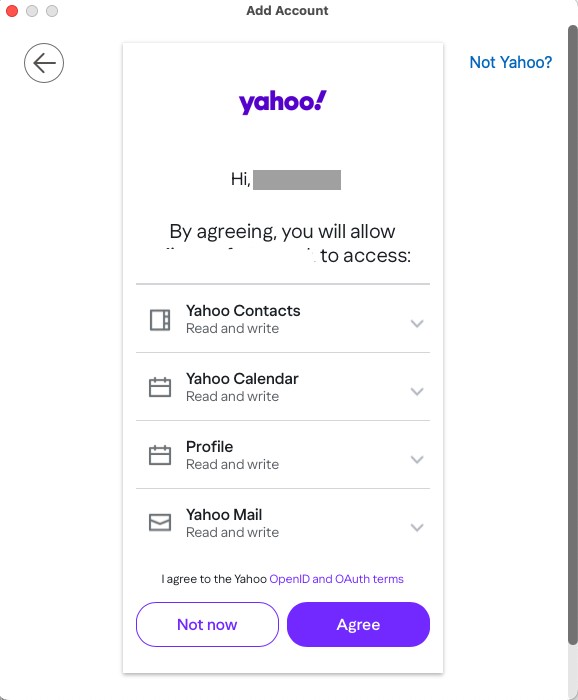
Ok your mail settings seem fine and Norton’s wasn’t the problem, so suggest to next “try removing and readding your Yahoo Sky account” via the add account automatic wizard in Accounts. Make sure at the end of the wizard when you get the prompt “to allow eM Client access to your Yahoo / Sky mailbox” make to press that, as it uses an OAuth2 passwordless token.
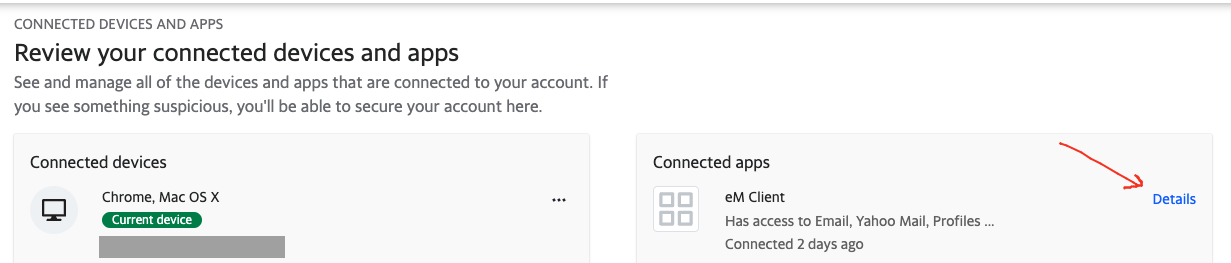
If the token authorisation “doesnt work at the end of the wizard”, then go into your Yahoo / Sky account and “remove the previous OAuth2 eM Client app token”, and then remove your Yahoo / Sky account again from eM Client.
Then “close eM Client” and “clear your browser cache completely”. Then reopen eM Client and try readding your Yahoo / Sky account again via the automatic account wizard as another Yahoo / Sky user has to do in this thread.
If it still won’t work, then upgrade to Windows 10 and try again as might then be a Windows 7 OS issue where something might have changed.
Note: Before removing and readding your account, make a manual backup of eM Client first incase you need to restore for any reason. You can see when the backup is complete in Show Operations via clicking the drop-down on the right of Refresh top left.
You are so quick to respond - thank you!
You haven’t commented upon my “stupid” suggestion but your proposal is somewhat simillar but more specific. I think that I understand it but just give me time and I will get back to you. Is my suggestion a possible alternative route or rubbish?
Regards
Dikda
Hi cyberzork
“Make sure at the end of the wizard when you get the prompt “to allow eM Client access to your Yahoo / Sky mailbox” make to press that, as it uses an OAuth2 passwordless token”.
The above prompt does not appear and I can find no reference anywhere in the Yahoo site about ‘tokens’ and believe me I HAVE LOOKED!
I am now considering attempting to open/resurrecting an existing but ‘time expired’ emclient prog which I have available on another very powerful HP 17" laptop running Windows 10, BUT it will use the identical account details and I am concerned that the problem may get transferred - WILL IT??? I am unsure about the back up that I have made of the folders etc being suitable to be transferred/inputted to this ‘new’ laptop - will that be possible?
Further advice and opinion please as I am really struggling now!
Regards,
Dikda
[/quote]
The above prompt does not appear.
When you run the eM Client setup account wizard, “near the end” for a eg: Yahoo / Sky account, you will see a screen like in the below first example screenshot to then Agree to give eM Client access to your Yahoo mailbox & calendar, contacts etc.
If you don’t see see that, try closing eM Client and “set another browser as default” and then reopen eM Client and go back to “Menu / Accounts” and try adding your Yahoo / Sky account again.
“I can find no reference anywhere in the Yahoo site about ‘tokens’ and believe me I HAVE LOOKED”
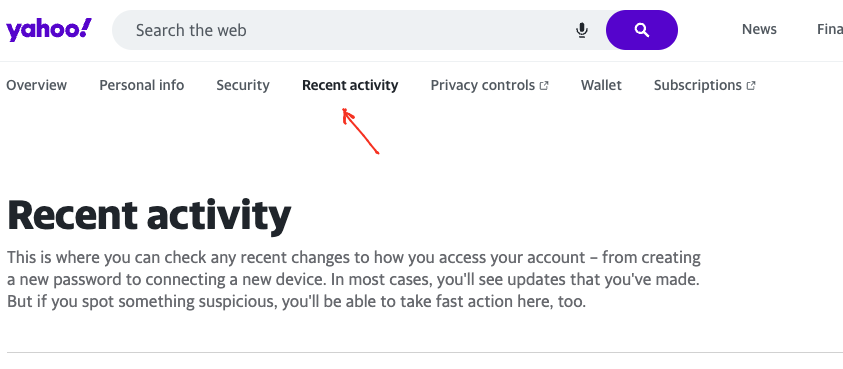
Usually the eM Client app OAuth2 token for a Yahoo account is located online in the eg: “Recent Activity” section as per the below two screenshot examples.
I am now considering attempting to open/resurrecting an existing but ‘time expired’ emclient prog which I have available on another very powerful HP 17" laptop running Windows 10, BUT it will use the identical account details and I am concerned that the problem may get transferred - WILL IT???
Its not likely you would have the same problem on a Windows 10 system. Just sounds like something gone wrong in your Windows 7 system.
So if you want to transfer your existing eM Client complete settings to Windows 10 without setting up again from scratch, then suggest to use the built-in backup and restore feature as per either of the below links.
Thank you - so quick - you obviously keep similar hours to me!
Give me a little time and I WILL report back.
Regards,
Dikda