Hello world!
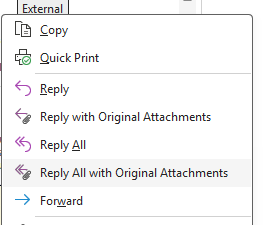
my topic is a suggestion for all those who, like me, use other email clients and that in the reply message with attachments, all the recipients of the conversation already appear, in addition to the original attachments.
I noticed that eM Client it’s powerfull and history attach and email is “musthave” function…
But the forward does not take into account all the recipients of the message, those in copy and therefore you risk losing some contacts who did not receive it.
Yes I know, best practice says “forward to and don’t reply” for attachments…
So I tried to use that function but I had to copy the recipients or re-enter them manually… very often it happens that they are not all there!
So I asked myself what to do to fix it?
I tried and it works like this: I open the message, do a “reply to all” and then drag the attachments of the open message into the new reply message.
In theory, by doing this you do not lose the contacts (in fact it is a “reply to all”) and the attachments should not re-transit as traffic.
Have you also tried or do you have better suggestions for this topic?