I have been using eM Client for a month now, and after dozens of years with Outlook, I can say I’m very satisfied.
There are only two features I miss, but maybe I just haven’t found them yet:
With the “A” shortcut, which I replaced with Backspace, I can archive an email. However, it goes to “All Mail” because I use a Google Workspace account, rather than to a specific folder. In the past, I used to archive messages in folders like Archive > Year, so when I needed to search for something recent, I knew where to look and searches were much faster.
In Outlook, when you click the root of an account, the search scope is the entire mailbox. In eM Client, to achieve this, I have to go to Custom and select the root of the account. But if I switch to another account, I have to redo the custom selection.
Am I correct that these features are not currently implemented? Is there any chance they might be added in the future?
I can archive an email. However, it goes to “All Mail” because I use a Google Workspace account, rather than to a specific folder. In the past, I used to archive messages in folders like Archive > Year
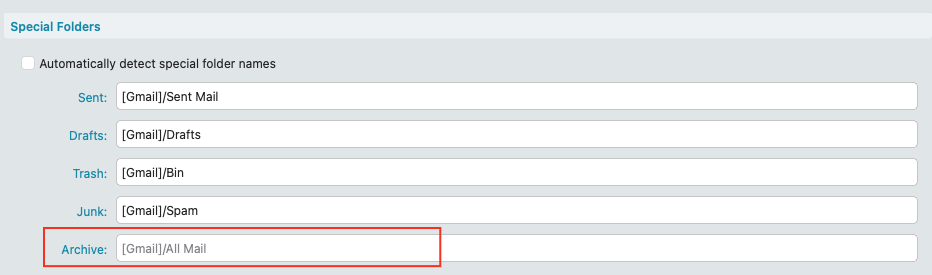
For Gmail IMAP accounts setup in eM Client you cannot select a custom folder for Gmail Archive using the Archive shortcut, as the Archive folder “is hardcoded to the server’s All Mail folder” and ghosted if you try to change it, matching the native web behaviour as per the screenshot example below. No idea how Outlook changed the default Gmail archive folder location.
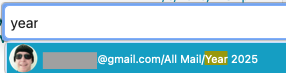
So if you want to specify Gmail Archive folders with a quick move shortcut, i would suggest you “manually create your Year folders under the Gmail All Mail folder” in the left panel by “right clicking on All Mail” and then once created, then on the email/s you want to archive, “press M” and “type year” which will then show you all the year folders under All Mail. You can then either just click on the Year you want with your mouse or use the down arrow and press enter.
thanks… the quick move was a solution that I use in the first days of emclient, but for me is too slow…
the “inbox zero” methodology that I apply must be very quick and immediate… Del for deleting, backspace (or A) for archiving… a popup window and a chose of a folder will slow too much the process