I switched my mailboxes from POP3 to IMAP, and all settings—such as server configurations and passwords—are correct for my four accounts. However, an exclamation mark (!) appears for two of them whenever I launch eM Client and perform a send/receive operation.
The mark disappears when I go into the account settings and run a test.
What could be the reason for this? It bothers me to see that (!) symbol there.
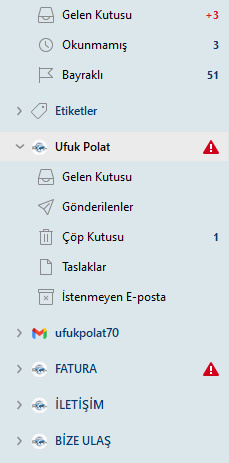
What are your imap server settings so we can see if there is any obvious settings wrong.
Also clickclick the red exclamation and what errors are you seeing.
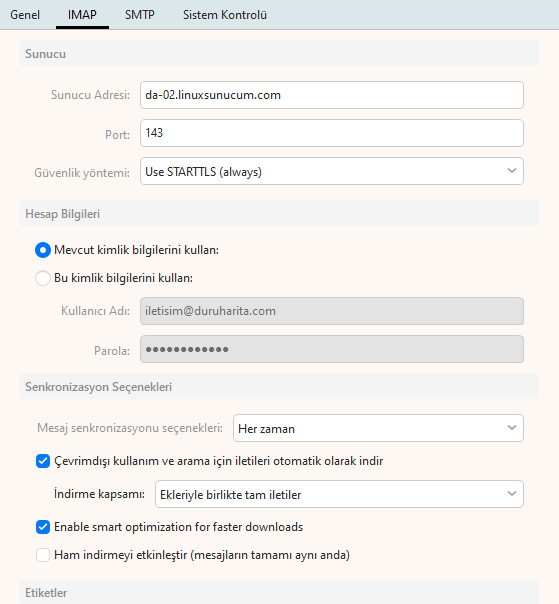
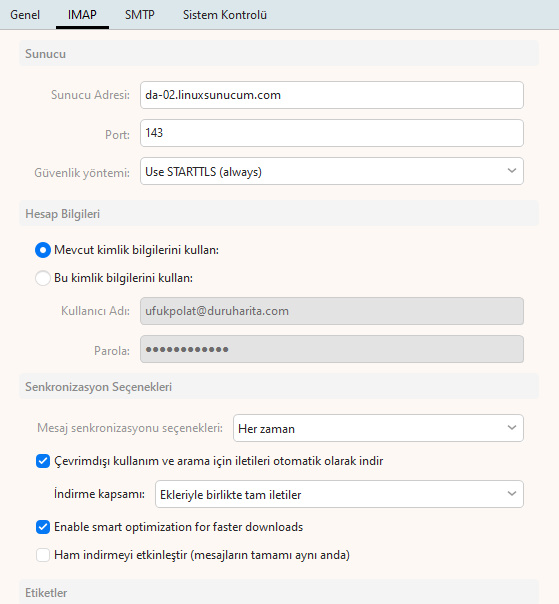
I double-click the red exclamation mark, but nothing happens. I am sharing screenshots of the server settings for both accounts—the one without the exclamation mark and the one with it. The “[email protected]” account doesn’t have an exclamation mark, but the other one does!
What might I be overlooking?
The other picture is right below…
Ok click the dropdown on the right of Refresh and click “Show Operations” and click the “Log” tab and look for any obvious error messages and paste them in this thread and we might then be able to see what’s wrong.
Blank out anything personal in the log errors.
Also these are the IMAP and SMTP server settings you can use with eM Client depending on what your server supports.
eM Client V10.3 or higher
(IMAP)
Server address - xxxxxx.xx
Server Port - 993
Security Policy - "Use TLS on Special Port”
Or
Server Address - xxxxxx.xx
Server Port - 143
Security Policy - "Use STARTTLS if available”
(SMTP)
Server Address - xxxxxx.xx
Server Port - 587
Security Policy - "Use STARTTLS (Always)”
Or
Server Address - xxxxxx.xx
Server Port - 465
Security Policy "Use TLS on Special Port”
—
eM Client V6 to V10.2
(IMAP)
Server Address - xxxxxx.xx
Server Port - 993
Security Policy - “Use SSL/TLS on special port (legacy)”
Or
Server Address - xxxxxx.xx
Server Port - 143
Security Policy - Use SSL/TLS if available
(SMTP)
Server Address - xxxxxx.xx
Server Port - 587
Security Policy - “Force usage of SSL/TLS”
Or
Server Address - xxxxxx.xx
Server Port - 465
Security Policy - “Use SSL/TLS on special port (legacy)”
eM Client 10.4.5674+fcbf2a4bb4 (Windows)
From the looks of that server log, it looks like either a “server problem” or “server setup not quite right” or “possibly needs a string” in your account setup to connect.
So I would suggest you lodge an official ticket.
If you have a current active paid license go to the VIP support page and login and lodge a support ticket and “link this thread” so they can see the log & imap settings.
Also “include your eM Client version” and “Windows or Mac OS” version.
If you have run out of your 12 months support time, then you can extend that via the following page for another year VIP Support Extension | eM Client
It turns out there was an issue with the compression of some emails; they fixed it on the server side. Thank you for your attention to the matter.