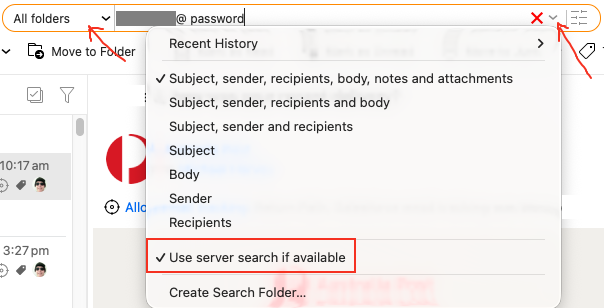
I needed to find all emails that were from a particular email address and contained the word “password” I entered the first part of the email of the email address up to the @ and the word password in the global search box. Nothing showed up.
What am i doing wrong. The pulldown menu did not help me at all
I still have Thunderbird installed. Fired it up and did the search using the same terms and bam in the results it return was the email I was looking for!
Sigh. The text was in a collapsed email in a thread. I could not see it nor could I do a CTL-F when I was in the thread because good old eMClient opened up Compose reply window.
If you have problems again searching with user@ password, first make sure you select “All Folders” and select “Subject, sender, recipient’s etc” if you haven’t already selected those options, and also try “disabling use server search if available” in the dropdown as per below example which speeds up the search time.
Thanks for the reply. I went out for a walk to cool off.
Afterwards I discovered that eMClient does NOT expand collapsed messages. Instead, it highlights the “…” over on the left-hand side ot the message body. My eyes were scanning the text in the message body looking for highlighted words. I entirely missed the highlighted … way over at the left-hand side of the message thread.